


Structured graduate and intern screening
William Buck’s case study describes AI interviews for graduate and intern screening, with candidate feedback collected alongside the hiring workflow.
Read the William Buck case studyCandidate insights
Candidate insights in Skill Society bring together candidate experience ratings, written feedback and interview activity. Review what responding candidates say and when completed interviews took place, then use that evidence to improve your process.
Example workflow
Candidate experience analytics
Candidate-experience proof
“Talking to Alex, the AI, was such a unique experience. It felt seamless and surprisingly engaging.”
How candidate insights work
Use candidate ratings and comments alongside interview-activity reports. Look at the available responses and the reporting scope before drawing conclusions about the wider candidate journey.
Review submitted interview-experience ratings, response counts and rating distributions. Use the written feedback to understand the context behind a score.
Your team can inspect the responses behind its candidate-experience discussion.
Candidate experience feedback
Step 01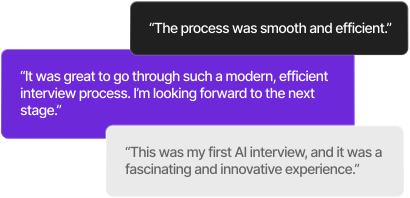
Illustrative comments show why a rating should be reviewed alongside the candidate's own words.
Read candidates' comments alongside the related role and interview record. Your team can identify recurring concerns and decide which deserve a closer look.
Process changes can be grounded in the words candidates actually submitted.
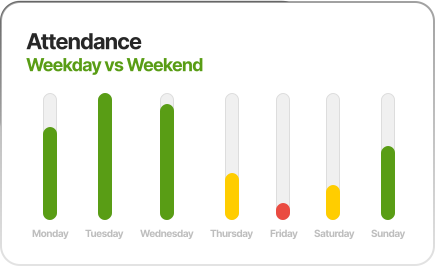
Review completed-interview counts across days of the week. These counts show when recorded interviews occurred; understanding non-completion requires examining the wider applicant workflow.
Your team can discuss interview participation with the correct reporting scope.
Compare interview activity by hour and day, including working-hours and after-hours counts. Use the pattern to inform how your team offers and supports on-demand interviews.
Timing information supports a discussion about candidate access and team availability.
Ready to understand the candidate journey?
Start with satisfaction and timing, then improve the friction your own data makes visible.
Customer outcomes across Skill Society
William Buck’s case study describes AI interviews for graduate and intern screening, with candidate feedback collected alongside the hiring workflow.
Read the William Buck case study

Pet Circle used on-demand AI interviews for high-volume blue-collar hiring, with 39% of candidates completing interviews after hours.
Read the Pet Circle case study
Wilbur’s case study reports more than 40 hours saved per hire after introducing AI interviews for technical screening. This result came from its wider hiring workflow.
Read the Wilbur case studyMeasure your own workflow
These stories show results from wider Skill Society screening and interview workflows. Candidate insights give your team ratings, written feedback and timing information to evaluate its own process.
Questions, answered
Candidate insights help hiring teams review interview-experience ratings, candidate comments and completed-interview activity. It supports evaluating the candidate journey while people decide which process changes to make.
Ratings and written feedback come from candidates who submit them after an interview. The feedback report shows the role, interview record, rating and comment where available. Missing responses should not be treated as positive feedback.
No. The charts show completed-interview counts by hour and day, including working-hours and after-hours activity. A higher count at one time does not by itself establish a higher completion rate or explain why other candidates did not finish.
The feature presents ratings, comments and activity for review. Your team reads the feedback, identifies concerns in context and chooses improvements. Candidate-experience feedback does not determine whether someone should be hired.
Report access depends on the account's Reports entitlement and the user's delegated permissions. Role-scoped Members see eligible data for their accessible roles; account-wide attendance and executive views are Administrator-only.
Review current plans on our pricing page and confirm the report access and usage appropriate for your account.
Read the privacy policy for data-handling information. Discuss your organisation's retention, access and security requirements with the team before rollout.