
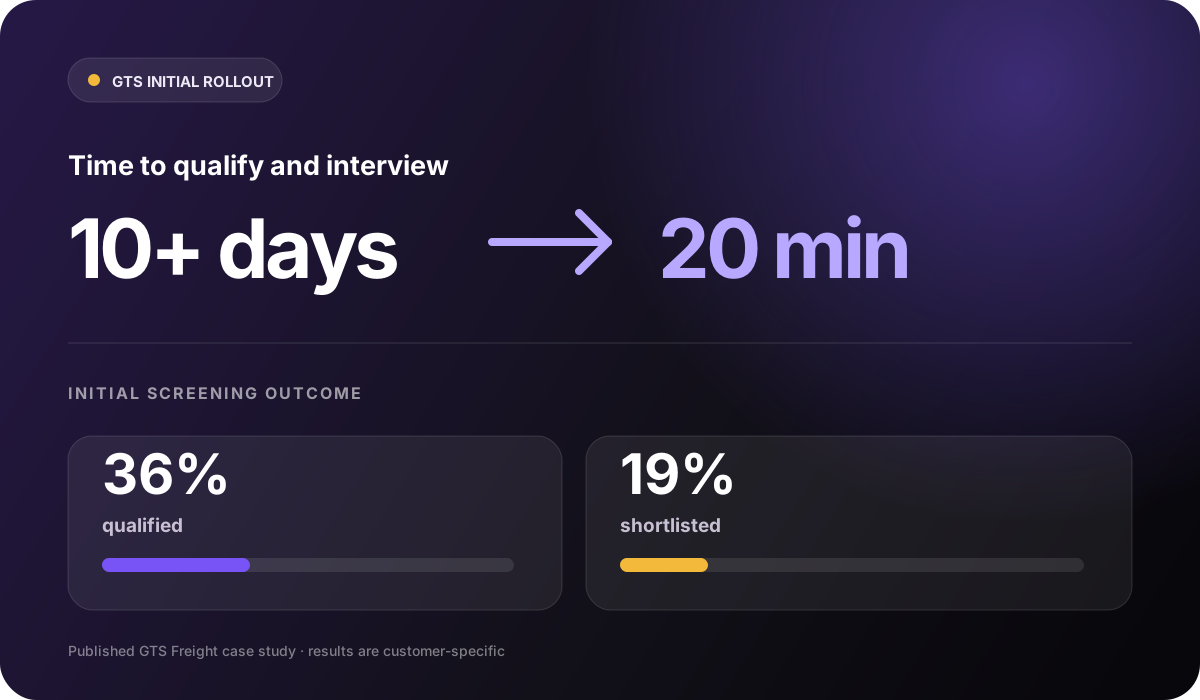

From 10+ days to 20 minutes
GTS connected SEEK applications, qualification, and interviews in its wider Skill Society workflow. The time result is not attributed to applicant tracking alone.
Read the GTS case studyApplicant tracking
Set up each role, bring candidates into one workspace and review pre-qualification, assessment evidence and hiring stages together. Your team makes the final decision.
Real platform · Demo data
Warehouse Team Member

Customer perspective
“One of our biggest challenges as a growing business was recruiting the right people—not just in terms of skills, but culture and mindset. Skill Society helped us develop a clearer, values-driven foundation for our hiring process. We’re now onboarding candidates who align deeply with our purpose and ways of working, which is saving us time, reducing turnover, and elevating the overall performance of the team.”
How applicant tracking works
Move from role setup to candidate review without rebuilding the process in spreadsheets, inboxes, and disconnected status lists.
Set the job details and description, application form, qualification rules, AI interview questions, follow-up workflow, candidate email templates, and publishing state for the role. Administrators control this configuration.
Every candidate enters the same reviewed process for the role.
Role setup
Step 01
The actual role editor, populated for Harbour & Pine. Job details, application requirements, interview setup and publishing stay in one sequence.
Share the role's public candidate link or paste candidate details to send personalised invitations in bulk. Skill Society records invitation details and source information for the role. Connections to supported applicant tracking systems (ATS) and job boards are configured separately by an administrator.
Candidates from different sources enter the same role-based workflow and invitation trail.
Search the role's candidates, filter by New, Shortlisted or Rejected, and review available AI interview and TalentFit results. Open the underlying report, see who owns the next step, and compare the evidence before your team decides who progresses.
The hiring team can compare the evidence behind each candidate before deciding who should progress.
Authorised team members can update a candidate's hiring-stage status from the role or recent-activity tables. Recent Activity brings the latest pre-qualification and assessment records together across roles the current user can access, with search, filters, and reporting windows.
Team members can see the next action for the roles they are authorised to work on.
Keep the next step clear for your hiring team.
Skill Society organises role setup, candidate evidence, and hiring stages. Your authorised team decides who progresses, who is rejected, and who is hired.
Outcomes from wider Skill Society workflows
GTS connected SEEK applications, qualification, and interviews in its wider Skill Society workflow. The time result is not attributed to applicant tracking alone.
Read the GTS case study
Wilbur saved more than 40 hours per hire through its wider Skill Society screening workflow. The result is not attributed to applicant tracking alone.
Read the Wilbur case study

Pet Circle let candidates interview around their schedules through its wider Skill Society workflow. The result is not attributed to applicant tracking alone.
Read the Pet Circle case studyStart with one role
These outcomes came from broader Skill Society screening and interview workflows. Applicant tracking keeps each role, its candidates, evidence and next actions connected.
Questions, answered
Understand the role workflow, team access, and the hiring tasks that remain with your people.
Skill Society tracks role-based applications through pre-qualification and assessment, keeps candidate evidence and hiring stages connected, and supports role setup, invitations, workflow communication, and recent activity. It does not currently provide requisition approval, offer-letter generation, e-signature, or employee onboarding, so teams needing those functions can use a supported ATS integration alongside Skill Society.
Yes. Administrators can configure role-specific job details, job descriptions, application questions, qualification rules, AI interview questions, follow-up behaviour, email templates, and publishing dates or status.
For an open role, your team can share the public candidate link or paste candidate details to send personalised invitations in bulk. Supported ATS and job-board connections can provide additional administrator-configured sources, and the invited-candidate view records available source information.
Yes. The role workspace brings applicant records and available interview and TalentFit evidence into the candidate table. You can search candidates, filter their hiring status, and open the underlying screening response or interview report. Where an interview has not been completed, the table shows its current status instead of an interview score.
Assigned role-scoped Members can view and operate candidates for their active assigned roles, including permitted day-to-day status actions. Administrators can access every active account role and control role configuration, team assignments, account settings, and other administrator-only actions.
No. Qualification rules can route answers to qualified, disqualified, pending, or review outcomes according to the configuration your team approves, but Skill Society does not make the final hiring decision. Authorised people control candidate stages and final outcomes.
A closed role stops accepting new candidate invitations. Administrators can review the role settings and existing candidate records, and the separate controlled rejection workflow becomes available only after the role has actually closed.
No. Administrators see every active role in their account. Role-scoped Members see only their assigned active roles. Available features also depend on the account's plan and the access delegated to each member.