

Pre-qualification

Check the essentials first. Give every candidate a clear next step.

Set up a first step that checks essential role requirements and collects the evidence your team needs. Your rules route applications to progress, human review or filter out before CV review.

  • Must-have questions for every role
  • Automatic progress, review, or filter
  • One consistent first step for every candidate
  • Human review for uncertain answers

Example workflow

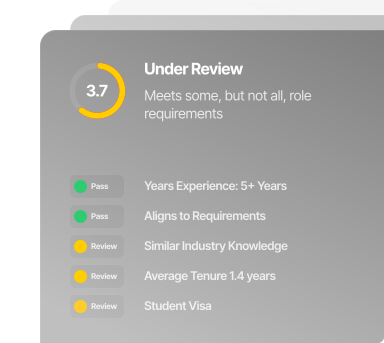
Candidate decision routing

Rules active
Strong Match candidate score with role requirement checks and review signals
Must-haves checkedEdge cases queuedNext step ready

A faster first pass can still feel human

Keep the first step clear and considerate.

“Talking to Alex, the AI, was such a unique experience. It felt seamless and surprisingly engaging.”
Candidate feedback · Pet Circle blue-collar hiring programmeme

How pre-qualification works

Set the requirements. Give candidates a clear next step.

Start with the real requirements for the role, turn them into a clear candidate experience, and decide what should happen after each answer.

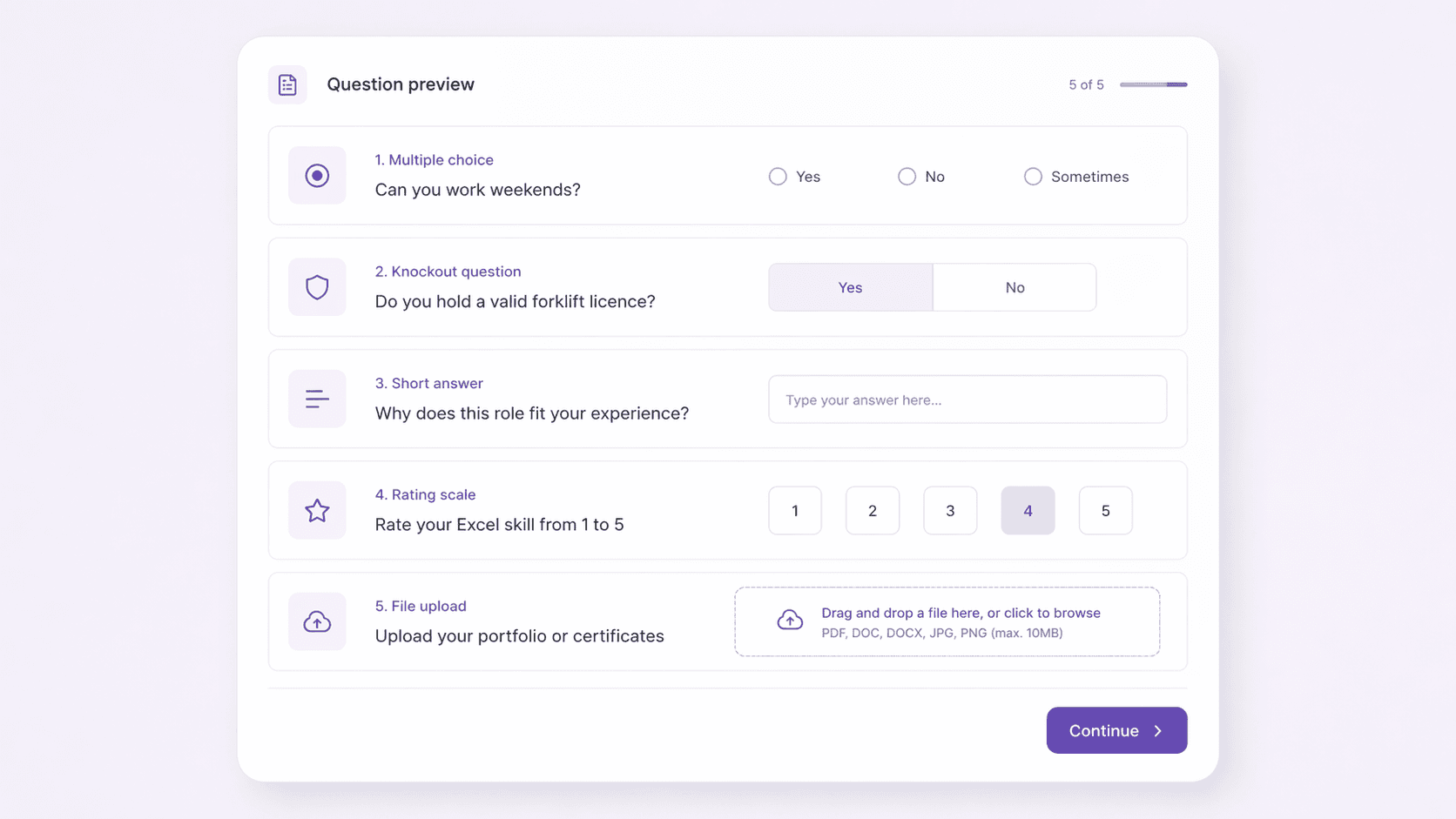
Turn the real requirements for the role into must-have, multiple-choice, short-answer, rating, and file-upload questions. Start with the checks your recruiters repeat for every applicant.

One role-specific standard, agreed before applications arrive.

Question builder

Step 01
Pre-qualification form builder with multiple choice, knockout, short answer, rating scale, and file upload question types

Mix knockout questions with richer evidence where context matters.

Ready to set up your first screening step?

Start with one role and a short list of genuine must-haves.

Outcomes from wider screening and interview workflows

See how teams use structured screening in practice.

Sands Fridge Lines refrigerated transport trucks
Sands Fridge Lines

Structured screening before interview

Across driver, pick-packer, and graduate logistics roles, Sands Fridge Lines used role-specific questions and document collection before interviews in its wider Skill Society workflow.

Read the Sands Fridge Lines case study

GTS logo
GTS

From 10+ days to 20 minutes

In its initial rollout, GTS reduced the time to qualify and interview candidates from 10+ days to 20 minutes using its wider screening and AI interview workflow. This is not time to hire or a guaranteed result.

Read the GTS case study
Pet Circle team member in a distribution facility
Pet Circle

38+ hours saved per hire

Pet Circle reported this time saving from its wider screening and interview workflow for delivery and forklift-driver hiring, rather than from pre-qualification alone.

Read the Pet Circle case study

Start with one role

Start with one role. Build on what works.

These customer outcomes came from wider screening and interview workflows. Choose a role with clear must-haves, map the decision paths, and measure the first results with your team before expanding.

Questions, answered

Questions about pre-qualification

Can we use different pre-qualification questions for each role?

Yes. You can build different forms, must-have checks, and routing logic for each role so retail, support, technical, and compliance-heavy hiring can all follow different rules.

What happens to candidates who are not a clear yes or no?

They can stay in a manual review path. Strong matches move forward automatically, clear mismatches can be filtered out, and recruiters still keep control over edge cases.

Does pre-qualification verify licences or supporting documents?

It collects candidate answers and requested documents so your team can review them. Collecting a document or routing an application does not independently verify a licence, qualification, work right, or compliance obligation. Your team remains responsible for those checks.

Does pre-qualification make the hiring decision?

No. Your team defines the role requirements and routing rules. Those rules can automatically progress or filter applications, while uncertain answers can go to human review. Hiring managers review the evidence and decide who is hired.

Should we create an account or book a demo?

Create an account when your role requirements are ready, or book a demo for help with questions and routing. Review the current plans and inclusions before starting a screening campaign.