

40+ hours saved per hire
Wilbur’s case study reports more than 40 hours saved per hire after introducing AI interviews for technical screening. This result came from its wider hiring workflow.
Read the Wilbur case studyTalentFit
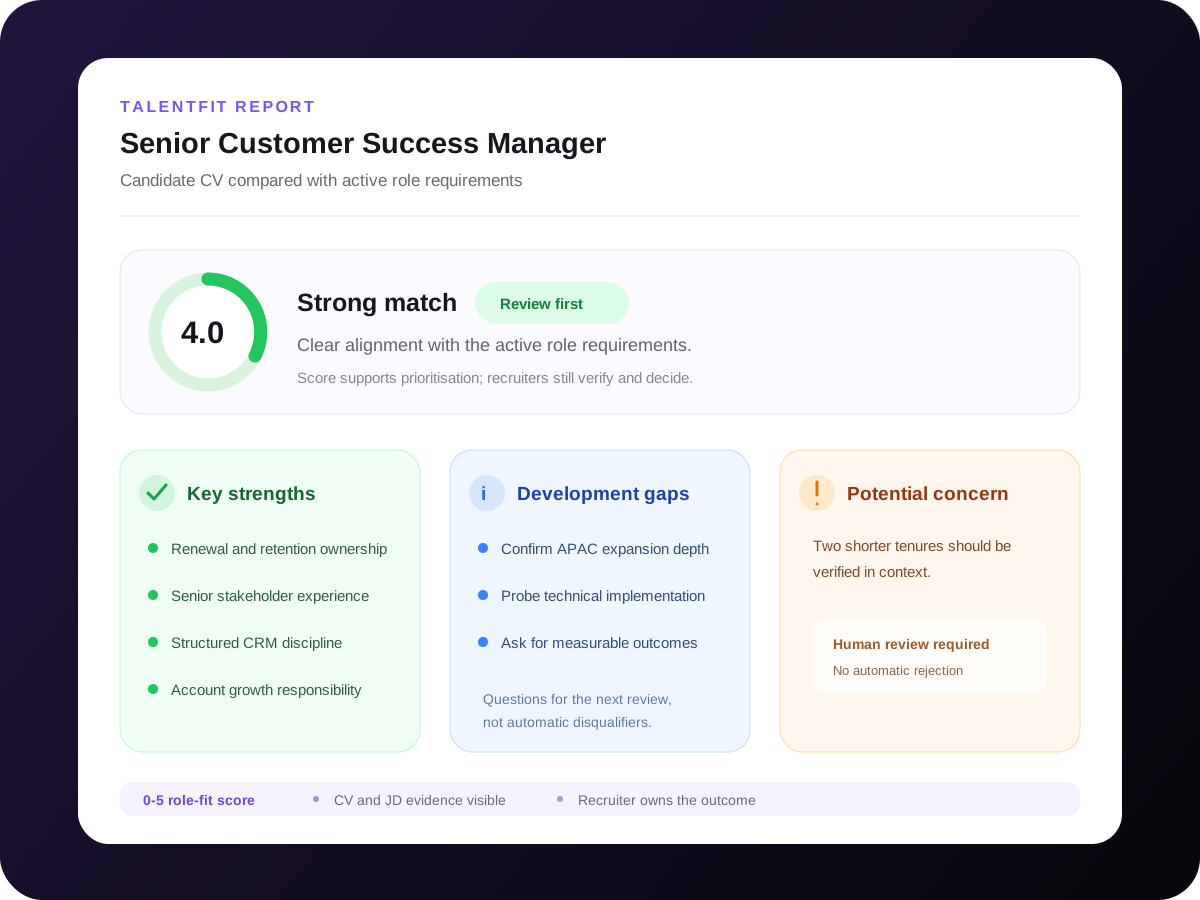
TalentFit analyses each candidate's CV against the active job description and gives recruiters a structured summary of strengths, gaps, and potential concerns before they decide who moves forward.
Example workflow
Senior Customer Success Manager
Customer proof from across Skill Society
“Talking to Alex, the AI, was such a unique experience. It felt seamless and surprisingly engaging.”
How TalentFit works
Start with the active role, generate a structured comparison, inspect the evidence, and keep recruiters in control of every outcome.
TalentFit uses the active job description as its source of truth: responsibilities, must-have skills, experience, qualifications, tools, and role context. If the job description or CV lacks enough detail, TalentFit marks the comparison as not comparable.
Every assessment is anchored to one real role and one consistent standard.
Active role criteria
Step 01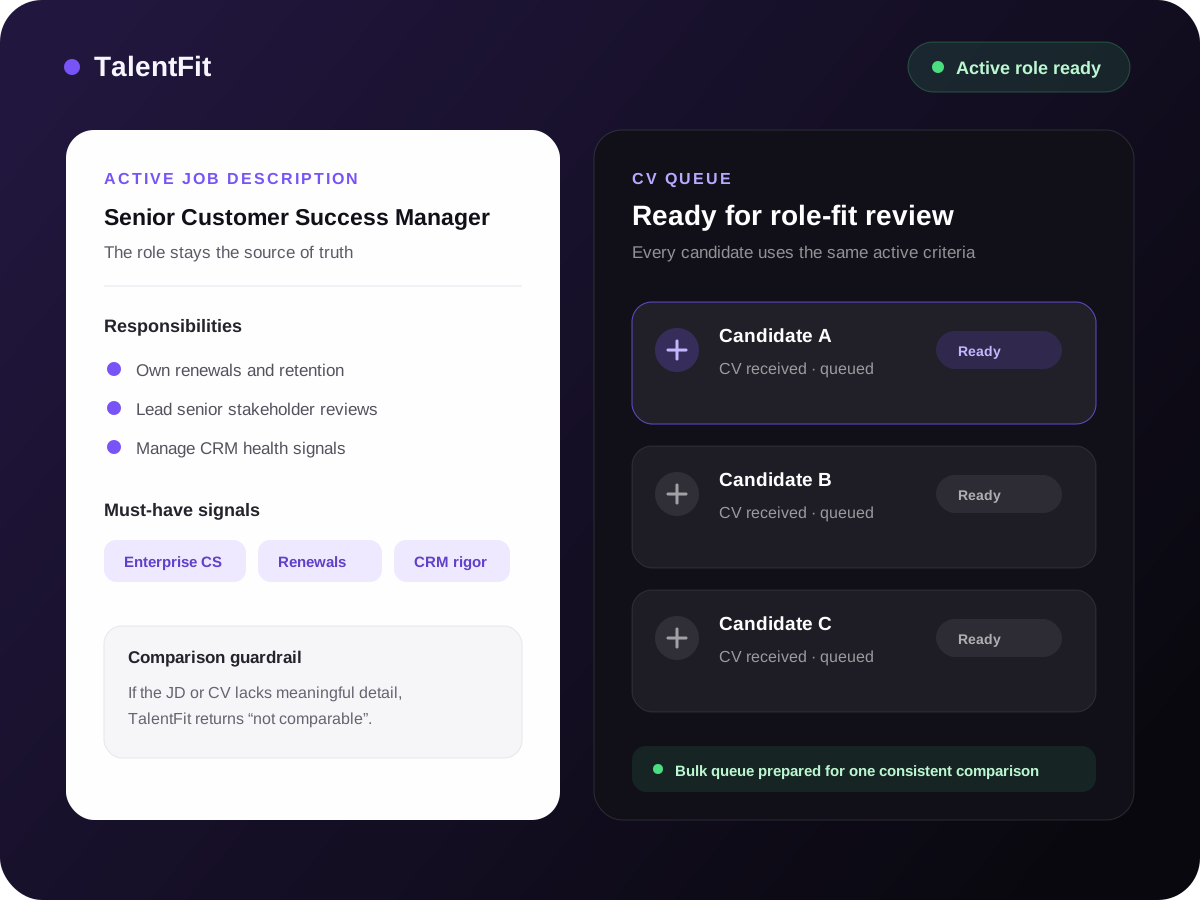
The job description sets the requirements before candidate comparisons begin.
The assessment returns a role-specific 0-5 fit score and a structured report instead of a generic CV summary. Recruiters can prioritise stronger signals while still opening the source evidence.
Your team can review CV comparisons together to build its shortlist.
Review positive signals, missing requirements, and potential concerns in one place. Each item stays tied to the CV-to-job comparison so recruiters know what to verify before interview.
Hiring managers can review the evidence supporting each candidate’s fit score.
TalentFit does not automatically reject candidates. Recruiters review the CV and job description evidence, verify gaps and concerns in context, decide the next step, and can return review-ready results to their existing ATS workflow.
Your hiring team decides the next step for every candidate, including during bulk CV review.
Ready to review a stronger shortlist?
Start with one active role, or book a demo to discuss bulk CV review and your ATS workflow.
Customer outcomes across Skill Society
Wilbur’s case study reports more than 40 hours saved per hire after introducing AI interviews for technical screening. This result came from its wider hiring workflow.
Read the Wilbur case study

IDVerse used on-demand AI interviews to qualify offshore developer candidates faster, saving more than 80 hours while expanding offshore hiring.
Read the IDVerse case study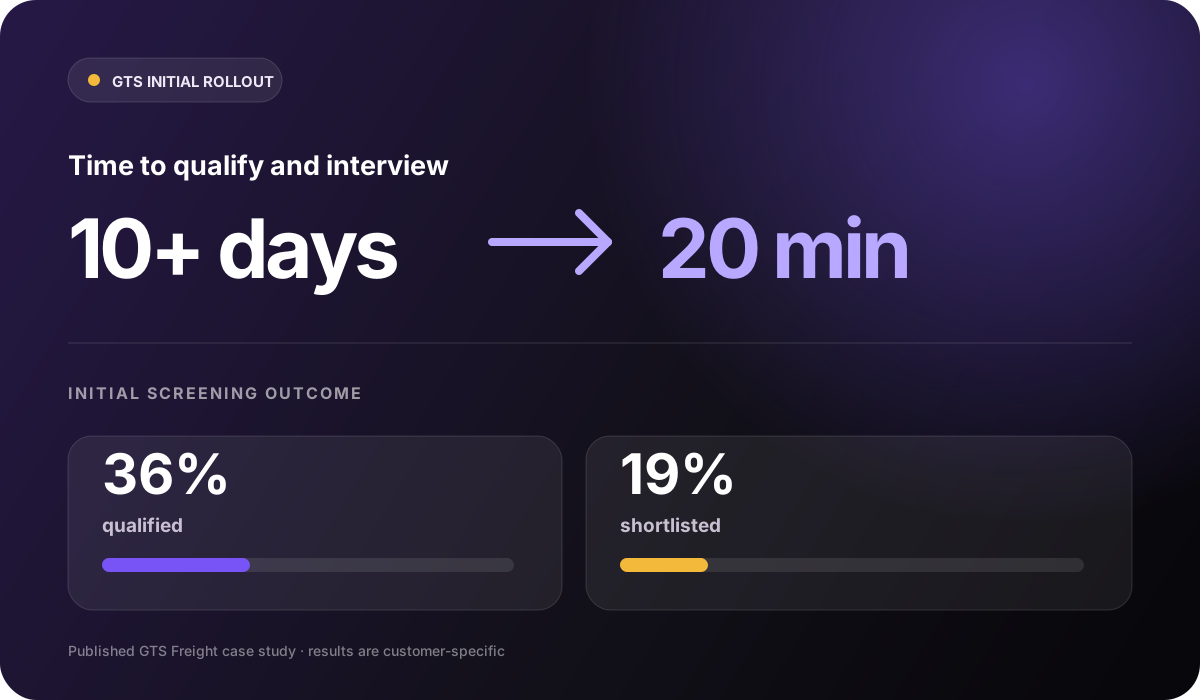

In its documented initial rollout, GTS reduced qualification and interview time from more than 10 days to 20 minutes. This measures the first screening stages, not the time to a completed hire.
Read the GTS case studyStart with one active role
These stories show results from wider Skill Society screening and interview workflows. Begin with one job description, review the evidence with your team, and measure TalentFit on the time and shortlist quality it changes for you.
Questions, answered
No. TalentFit highlights CV-to-role evidence so recruiters can review faster and more consistently. Your team still verifies the output and makes the hiring decision.
No. TalentFit produces a CV-to-job comparison for people to review. Recruiters can use the report to prioritise candidates and investigate gaps; generating a TalentFit report does not itself reject the candidate. Separately configured pre-qualification rules can filter applications.
It compares the candidate CV directly against the job description for the active role. The result is not a generic CV score; it is a role-fit view with strengths, gaps, potential concerns, and a 0-5 score.
TalentFit helps each candidate get reviewed against the same role requirements. It should support a structured human process, not replace policy, recruiter judgement, or your team's own review standards.
TalentFit uses the candidate CV and job description to generate the fit report for that role. If you need to review privacy, security, or ATS workflow details before rollout, book a demo.
A score of 0 means the comparison cannot be performed or is not applicable; it is not the lowest suitability rating. If the job description lacks enough requirements, TalentFit should return 0 with no strengths, gaps, or concerns. Review the source documents and supply the missing information before relying on a result.
Yes. TalentFit can support bulk CV review in the hiring workflow, so teams can queue multiple candidates and review the completed fit reports together.
Create an account when you have a role and job description ready. Book a demo for help with role criteria, bulk review, or ATS setup. Check the current plans and inclusions for access before starting assessments.